n8n is a great tool that just has infinite possiblities. I had a task where I wanted to create web forms. I decided to go with n8n as I didn’t want to maintain and run web server, keep updating libraries, manage authentication. But my initial tests with n8n were not very rewarding. The main issue was to dynamically pop up values in the form.
Trick here is to use http webhook request, that responds with webpage. We can fetch subscription/resource group values in the http response.
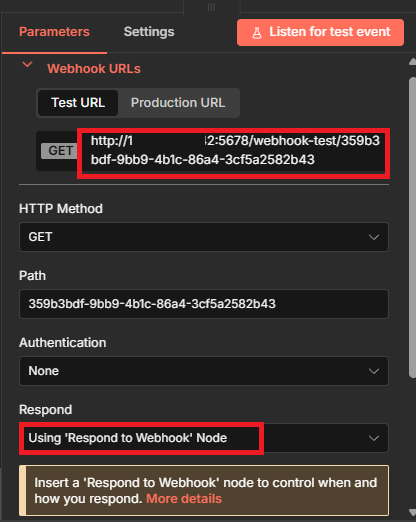
Below is my webhook request node:
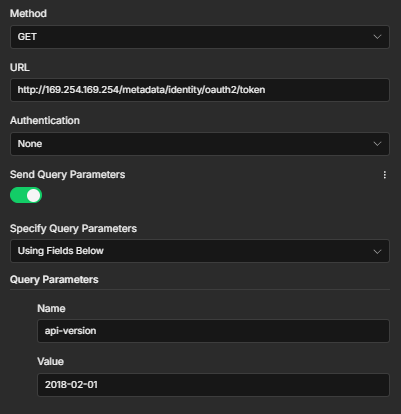
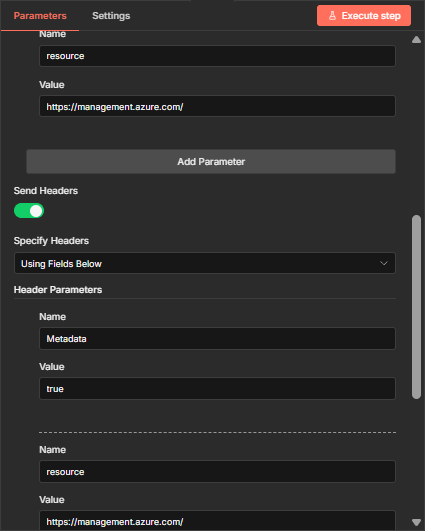
After this node, use HTTP request node for Managed identity authentication. This will respond with Token that can be used further.
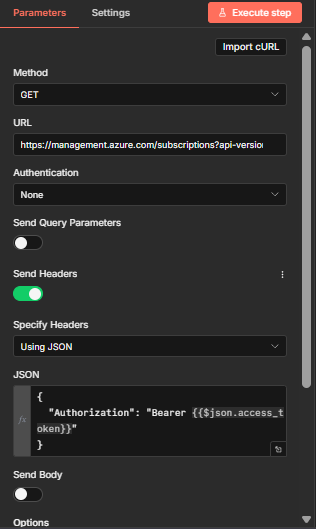
To get list of subscriptions, use another HTTP request node and pass bearer token in request header as shown below:
Use Javascript node to get the list of all Azure Subscriptions:
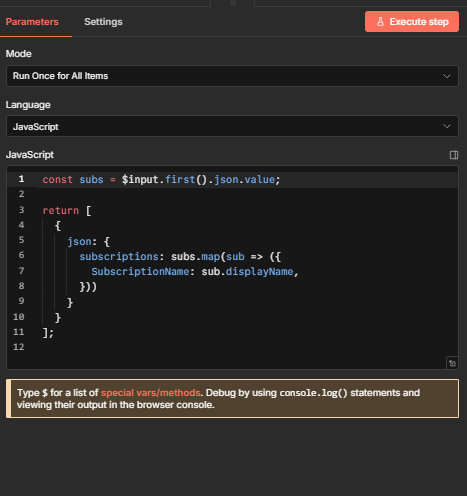
Below is the json code:
const subs = $input.first().json.value;
return [
{
json: {
subscriptions: subs.map(sub => ({
SubscriptionName: sub.displayName,
}))
}
}
];
Add webhook response node as below. Replace <n8nip> in AKS form action.
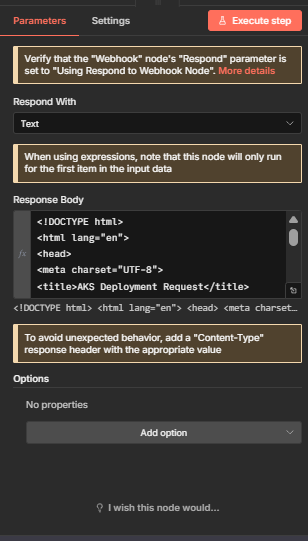
Full response Body:
<!DOCTYPE html>
<html lang="en">
<head>
<meta charset="UTF-8">
<title>AKS Deployment Request</title>

<style>
:root {
    --page-bg: #f1f5f9;
    --form-bg: #ffffff;
    --field-bg: #f8fafc;
    --primary: #2563eb;
    --border: #cbd5e1;
    --text: #0f172a;
    --muted: #64748b;
}

* {
    box-sizing: border-box;
    font-family: "Segoe UI", Inter, system-ui, sans-serif;
}

body {
    margin: 0;
    min-height: 100vh;
    background: var(--page-bg);
    display: flex;
    justify-content: center;
}

.container {
    width: 100%;
    padding: 48px;
}

.form-wrapper {
    background: var(--form-bg);
    border: 2px solid var(--border);
    border-radius: 16px;
    padding: 40px 48px;
}

.header {
    margin-bottom: 36px;
}

.header h1 {
    font-size: 32px;
    margin: 0;
    color: var(--text);
}

.header p {
    font-size: 16px;
    color: var(--muted);
    margin-top: 8px;
}

.form-grid {
    display: grid;
    grid-template-columns: repeat(2, minmax(0, 1fr));
    gap: 28px 36px;
}

.form-group {
    display: flex;
    flex-direction: column;
}

.form-group.full {
    grid-column: span 2;
}

label {
    font-size: 15px;
    font-weight: 600;
    color: var(--text);
    margin-bottom: 6px;
}

input, select {
    background: var(--field-bg);
    border: 1.5px solid var(--border);
    border-radius: 10px;
    padding: 14px 16px;
    font-size: 16px;
    color: var(--text);
}

input:focus, select:focus {
    outline: none;
    border-color: var(--primary);
    box-shadow: 0 0 0 4px rgba(37,99,235,0.15);
    background: #ffffff;
}

.actions {
    margin-top: 44px;
    display: flex;
    justify-content: flex-end;
}

button {
    background: var(--primary);
    color: white;
    border: none;
    padding: 14px 36px;
    font-size: 16px;
    font-weight: 600;
    border-radius: 12px;
    cursor: pointer;
}

button:hover {
    background: #1d4ed8;
}

@media (max-width: 900px) {
    .container {
        padding: 24px;
    }
    .form-grid {
        grid-template-columns: 1fr;
    }
}
</style>
</head>

<body>

<div class="container">
<div class="form-wrapper">

<div class="header">
    <h1>AKS Deployment Request</h1>
    <p>Provide required details to provision private AKS in IDC connected network</p>
</div>

<form
  id="aksForm"
  method="POST"
  action="http://n8nip:5678/webhook/3437f9b0-07e3-4a15-8c9b-c272f43d4663"
>

<div class="form-grid">

    <!-- 🔹 Dynamic Subscription Dropdown -->
    <div class="form-group full">
        <label>Subscription</label>
        <select id="subscriptionSelect" name="sub" required>
            <option value="">Loading subscriptions...</option>
        </select>
    </div>

    <div class="form-group">
        <label>Resource Group</label>
        <input type="text" name="rg" placeholder="Resource group name" required>
    </div>

    <div class="form-group">
        <label>AKS Name</label>
        <input type="text" name="aksname" placeholder="AKS cluster name" required>
    </div>

    <div class="form-group">
        <label>AKS Version</label>
        <input type="text" name="aksversion" placeholder="Leave empty for default">
    </div>

    <div class="form-group">
        <label>Pricing Tier</label>
        <input type="text" name="akstier" placeholder="Free / Standard / Premium">
    </div>

    <div class="form-group">
        <label>System Nodepool Size</label>
        <input type="text" name="sysnodepoolsize">
    </div>

    <div class="form-group">
        <label>User Nodepool Size</label>
        <input type="text" name="usrnodepoolsize">
    </div>

    <div class="form-group">
        <label>Min System Nodes</label>
        <input type="text" name="minsysnodes">
    </div>

    <div class="form-group">
        <label>Min User Nodes</label>
        <input type="text" name="minusrnodes">
    </div>

    <div class="form-group">
        <label>Max System Nodes</label>
        <input type="text" name="maxsysnodes">
    </div>

    <div class="form-group">
        <label>Max User Nodes</label>
        <input type="text" name="maxusrnodes">
    </div>

    <div class="form-group full">
        <label>VNet ID</label>
        <input type="text" name="vnetid">
    </div>

    <div class="form-group full">
        <label>Subnet ID</label>
        <input type="text" name="snetid">
    </div>

    <div class="form-group full">
        <label>Route Table ID</label>
        <input type="text" name="routeid">
    </div>

    <div class="form-group full">
        <label>Private DNS Zone ID</label>
        <input type="text" name="pvtdnszone">
    </div>

    <div class="form-group">
        <label>Location</label>
        <input type="text" name="location" required>
    </div>

    <div class="form-group">
        <label>No Proxy</label>
        <input type="text" name="noproxy">
    </div>

    <div class="form-group">
        <label>Owner Email</label>
        <input type="email" name="aksowner">
    </div>

    <div class="form-group">
        <label>Application Name</label>
        <input type="text" name="aksappname">
    </div>

</div>

<div class="actions">
    <button type="submit">Submit Request</button>
</div>

</form>

</div>
</div>

<!-- 🔹 Dynamic Fetch Logic -->
<script>
async function loadSubscriptions() {
    const select = document.getElementById("subscriptionSelect");

    try {
        const response = await fetch("http://n8nip:5678/webhook/get-subscriptions");
        const data = await response.json();

        select.innerHTML = '<option value="">Select subscription</option>';

        data.subscriptions.forEach(sub => {
            const option = document.createElement("option");
            option.value = sub.name;   // or sub.id if you prefer
            option.textContent = sub.name;
            select.appendChild(option);
        });

    } catch (error) {
        select.innerHTML = '<option value="">Failed to load subscriptions</option>';
        console.error("Subscription fetch failed:", error);
    }
}

document.addEventListener("DOMContentLoaded", loadSubscriptions);
</script>

</body>
</html>